Skip to content

Recover analytics data blocked by ad blockers

Introtrace serves blocked analytics scripts and relays supported blocked event requests. Start by confirming the block, then test recovery and verify receipt in your analytics tool.

Uses cdn.introtrace.com by default. A custom CNAME subdomain is available on paid plans.

Start with a diagnosis

Confirm the cause before testing recovery

Missing analytics can also come from consent choices, tag configuration, or report filters. A controlled comparison helps separate those causes.

1

Establish a baseline

On a test page, disable the blocker, accept analytics consent, and trigger one event. Confirm it reaches the intended property.

2

Reproduce the block

Enable the blocker, keep the page and consent choice unchanged, and repeat. Check the script download and event request separately.

3

Verify recovery

Enable recovery with the blocker still on. Confirm the event and parameters in your tool, then check duplicates and declined-consent behavior.

Follow the GA4 blocked-request diagnostic or the GTM container diagnostic for your setup. Our recorded Brave recovery test includes browser observations and GA4 verification, with the tested configuration and limits stated.

How Introtrace works

Site Visitor
❌ Blocked by Ad Blocker
✓ Recovered via Introtrace
Your Analytics

Script

proxying

1 line

to install

Event

relay

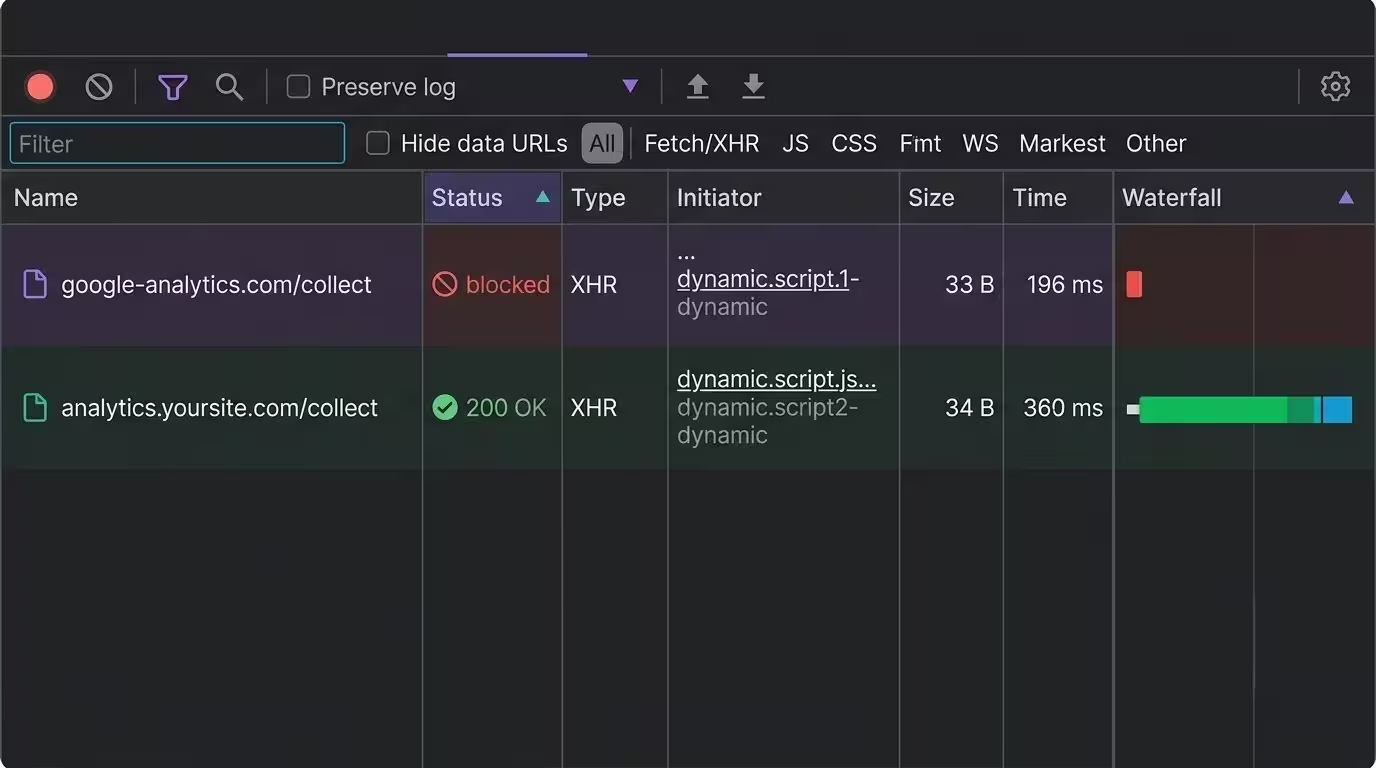
Browser DevTools network panel showing a blocked request to google-analytics.com with no response, alongside the same request succeeding through a first-party Introtrace subdomain

The mechanics

What exactly gets blocked — and what doesn't

Ad blockers can prevent a tracking script from loading or stop an event request after the script runs. Introtrace addresses these two failures through script proxying and event relay.

Commonly targeted endpoints

google-analytics.com
googletagmanager.com
connect.facebook.net
static.ads-twitter.com
snap.licdn.com
analytics.tiktok.com
cdn.amplitude.com
cdn.mxpnl.com

Other request paths to check

yoursite.com/api/*
analytics.yoursite.com/*
Server-to-server API calls
CDN requests (yoursite.com)
Events collected by your backend
Webhook and backend events
Your own subdomain endpoints
Edge function requests

Recovery requests use cdn.introtrace.com by default. On a paid plan, you can configure a CNAME to use your own subdomain. Verify delivery using the same browser and blocker configuration that produced the failure.

The fix

How Introtrace recovers your blocked data

Introtrace serves blocked scripts and relays blocked analytics events through its proxy. Recovery uses the shared CDN by default; paid plans support a custom subdomain.

1

Add one script tag

One line of code on your site. Nothing server-side, nothing to configure — it sits alongside GA4, GTM, and whatever marketing pixels you're already running.

2

Blocked signals detected

The instant an ad blocker or privacy extension kills an analytics signal, the script notices. Signals that were never blocked don't get touched at all.

3

Data recovered to your tools

Blocked signals go back out through cdn.introtrace.com, or your own subdomain on a paid plan with a CNAME, and land where they were headed. Confirm receipt in GA4, Meta Pixel, or the provider configured by your tags.

Coverage

Supported analytics, marketing, and experimentation tools

Coverage varies by tool and configuration. Verify recovery and event receipt after installation, or contact us about a specific integration.

Google AnalyticsGoogle Tag ManagerFacebook PixelAmplitudeMixpanelSegmentHotjarIntercomHubSpotLinkedInTwitter/XTikTokDoubleClickGoogle AdsPinterestMicrosoft AdsMicrosoft ClarityFullStoryCrazy EggMouseflowHeapPendoKlaviyoSnapchatRedditQuoraCriteoTaboolaOutbrainAdRollYahoo AdsCloudflare Web AnalyticsOneTrustCookiebotUsercentricsDidomiQuantcast Choice / InMobi CMPTrustArcSourcepointOsanoOptimizely ExperimentationGrowthBookConvert ExperiencesVWO Web Testing
See supported integration details
ToolWhat Introtrace recovers
Google AnalyticsAnalytics scripts and collection requests
Google Tag ManagerTag Manager containers and Google tag scripts
Facebook PixelPixel scripts and tracking requests
AmplitudeAnalytics SDK scripts and event requests
MixpanelAnalytics scripts, event requests, and configuration
SegmentAnalytics scripts and event API requests
HotjarTracking scripts and collection requests
IntercomMessenger scripts and widget API requests
HubSpotTracking scripts and HubSpot requests
LinkedInInsight Tag scripts and tracking pixels
Twitter/XPixel scripts and analytics requests
TikTokPixel scripts and event API requests
DoubleClickConversion, audience, and Floodlight measurement requests
Google AdsConversion scripts and measurement requests
PinterestTag scripts and conversion requests
Microsoft AdsUET scripts and tracking requests
Microsoft ClarityTracking scripts and collection requests
FullStoryCapture scripts and collection requests
Crazy EggHeatmap script downloads
MouseflowTracking script downloads
HeapAnalytics script downloads
PendoAgent scripts and application requests
KlaviyoTracking scripts and event API requests
SnapchatPixel scripts and event requests
RedditPixel scripts and tracking requests
QuoraPixel scripts and tracking requests
CriteoTracking scripts and measurement requests
TaboolaPixel scripts and event requests
OutbrainWidget scripts and tracking requests
AdRollTracking scripts and pixel requests
Yahoo AdsTracking scripts and analytics requests
Cloudflare Web AnalyticsBeacon scripts and performance measurement requests
OneTrustConsent scripts, assets, and geolocation requests
CookiebotConsent scripts, assets, and service requests
UsercentricsConsent UI scripts and service API requests
DidomiConsent SDK scripts and API requests
Quantcast Choice / InMobi CMPConsent scripts and measurement pixels
TrustArcConsent scripts and preference requests
SourcepointConsent messaging scripts and service requests
OsanoConsent scripts and service requests
Optimizely ExperimentationExperiment scripts, datafiles, and tracking events
GrowthBookConfiguration, remote evaluation, and streaming updates
Convert ExperiencesTracking scripts, logs, and metrics
VWO Web TestingTesting scripts, settings, and tracking events

Recovery covers recognized vendor endpoints. Verify delivery in your configuration.

Need an integration or feature we don’t support yet? Contact us and tell us what you need.

The cause

Why ad blockers block your analytics

It isn't a guess on their part — they're matching against maintained blocklists built specifically to target analytics and tracking domains. Once you see how that matching works, recovering the data is a lot more straightforward.

The filter lists

EasyPrivacy, uBlock Origin's own filters, Disconnect.me's tracking list — these community-maintained lists carry tens of thousands of patterns aimed at known analytics domains, and get updated daily as new tracking endpoints show up.

google-analytics.com/collect
googletagmanager.com/gtm.js
connect.facebook.net/fbevents.js
static.hotjar.com/c/hotjar.js
cdn.amplitude.com/libs/analytics.js

Browser-native blocking

Extensions are only half the picture. Brave, Firefox ETP, Safari ITP, and Edge ship tracking protection turned on by default, no install required — which means a real chunk of your audience is blocking analytics at the browser level without lifting a finger.

See the full browser-by-browser breakdown

Filter lists change as maintainers add or revise rules. Repeat your recovery checks when you change tags, browsers, or filter configurations.

How changing the request hostname can help

Routing a request through a different hostname can avoid a rule targeting the original endpoint. It does not guarantee that every blocking configuration will allow the request.

google-analytics.com/collect
analytics.yoursite.com/collect
google-analytics.com/collect ✓

Sources: Backlinko — Ad Blocker Usage Statistics · EasyList — EasyPrivacy Filter List · Brave — Shields

Why Introtrace

Why teams choose Introtrace to recover ad blocker data

2-Minute setup

One script tag, and that's it — no server changes, no DNS work on the free plan, no sprint to schedule.

Proxy payload handling

Raw analytics payloads are forwarded rather than stored in recovery reporting tables. Customer account data is covered separately in our Privacy Policy.

Recovers only blocked signals

A full proxy routes everything through itself. Introtrace steps in only when a signal's actually blocked — your allowance is based on recovered requests rather than total traffic.

Verify geographic attribution

Check that recovered events carry the visitor context your analytics provider expects. Compare a controlled visit with the resulting geographic and session reports.

Create a free account, scale as you grow

20,000 recovered signals per 30 days, free. Paid plans start at $9.99/month and add custom subdomain support through CNAME configuration.

Introtrace focuses on blocked script downloads and analytics requests. Compare your recovered volume and verify event receipt after installation; adoption statistics do not establish your site’s recovery rate.

Frequently asked questions

What's the fastest way to check if I'm losing analytics data right now?

Load the same page with your chosen blocker enabled and disabled, keeping the consent choice and test actions the same. Compare script downloads and measurement requests in the browser Network panel. A blocked request identifies a failure on that test visit, not a site-wide loss rate.

Which signals does Introtrace touch, and which does it leave alone?

Introtrace serves supported blocked scripts and relays supported blocked analytics requests. Requests that succeed directly continue to their original destinations. Your allowance counts recovered requests, including proxied script loads and event requests.

Is recovering ad-blocked analytics data legal and GDPR compliant?

Introtrace is a pass-through proxy that does not retain end-user analytics payloads. You remain responsible for the lawful use of your analytics tools and for consent where required. Review the Privacy Policy and Data Processing Agreement for the processing terms.

Do I need to re-tag or reconfigure my analytics to recover the data?

No — your GA4, GTM, and pixel setup stays exactly as it is. Introtrace recovers signals your tags already tried to send, so there's no container to rebuild. The one thing that matters is placement: put the Introtrace tag in your page head, ahead of GTM and your consent banner, so it's already running when those get blocked.

How long does it take to set up Introtrace?

Adding the script can take a few minutes if you can edit your site’s head. Allow additional time to verify event delivery, consent behavior, and performance. A paid-plan custom subdomain also requires CNAME configuration.

Does recovering blocked analytics violate user privacy?

Introtrace relays events from your existing analytics setup. It does not decide whether you have permission to collect them; your consent configuration must govern that. Raw analytics payloads are forwarded rather than stored in recovery reporting tables. Review the Privacy Policy for account data and processing details.

How do I know how much data I'm currently losing to ad blockers?

Scan a public page to identify requests blocked in the test configuration. To investigate broader gaps, compare equivalent analytics and server-side metrics for the same period. Account for consent choices, bots, and counting differences before attributing a shortfall to ad blockers.

Can ad blockers detect and block Introtrace?

Recovery is not guaranteed for every blocker configuration. Requests use cdn.introtrace.com by default; paid plans support a custom subdomain through CNAME configuration. Test your integration with the browsers and filter lists your visitors use.

Stop losing analytics data to ad blockers

Start free with up to 20,000 recovered signals per 30 days. Install the script and verify recovery on your own site.