


You test a shorter signup flow. A week later, the conversion rate has barely moved. Before you scrap the change, there’s another question to answer: did your testing tool see the people who used it?
Ad blockers can stop an experiment from loading. They can also let someone see a variation, then block the event that records their signup or click. Those failures leave different gaps in the results.
We tested both with Convert Experiences on Introtrace. Here’s what happened, what we could verify, and what we’d check before using a test like this to make a product decision.
Where ad blockers interrupt an A/B test
There are several steps between assigning a visitor to a test and counting their conversion. The script has to load, the page has to show the variation, and the testing tool has to record both the exposure and the outcome.
Check each step separately. A script can load successfully while its tracking requests are still blocked.
| Stage | What can go wrong | What to check |
|---|---|---|
| Load the experiment | The vendor script or configuration request is blocked. | Does the testing script load and start? |
| Show the variation | The change arrives late, fails, or is overwritten by the application. | Does the intended experience remain visible? |
| Record exposure | The visitor sees the variation, but the exposure event does not arrive. | Can the provider associate the visit with the right variation? |
| Record the outcome | A click, signup, or purchase happens, but its tracking request is blocked. | Does the goal arrive with the correct experiment and variation? |
A blocked loader may leave someone on the original page without enrolling them in the test at all. A blocked conversion request is easier to miss: the visitor gets the variation and takes the action, but the testing tool never hears about it. You can’t assume either visitor was counted like a normally assigned control visitor.
What missing data does to the result
Missing records don’t always affect a test in the same way. Microsoft Research’s work on telemetry loss describes two problems: less statistical power and biased results. Which one you face depends on whose data is missing and why.
These examples explain possible effects. We didn’t measure loss rates in the Convert demo.
| What’s missing | What it means |
|---|---|
| A random subset of complete participant records is lost equally across variants. | There is less usable evidence. Precision and statistical power fall. |
| An audience segment is systematically absent. | The observed result may not generalize to the people who are missing. |
| Outcomes are lost differently across variants or depend on visitor behavior. | The measured effect can be biased; more traffic alone does not repair the measurement. |
Even similar loss rates across the two variants deserve a closer look. Suppose the tool counts a visitor as assigned to the test but never receives their conversion. That lowers the reported conversion rate. Whether the comparison between variants is still useful depends on the metric and how those conversions went missing.
A tidy 50/50 split doesn’t settle this. Sample ratio mismatch flags an unexpected imbalance in group sizes. It won’t catch every missing conversion. Check an imbalance when you find one, but don’t use a balanced split as proof that tracking is complete.
Why this gets in the way of product decisions
The practical problem shows up when someone asks whether to keep working on a change.
- Onboarding: fewer recorded completions can leave you waiting longer for a clear result.
- Feature adoption: a missing usage event can look the same as a customer ignoring the feature.
- Campaigns: if tracking misses different portions of each audience, the dashboards become harder to compare.
None of that proves a flat result hides a successful idea. It means you need to check the tracking before you blame the idea.
The same problem affects before-and-after reports. Traffic, timing, and other changes already complicate those comparisons. If tracking coverage changed too, a rise or fall in the chart has another possible explanation.
What we verified with Convert Experiences
In October 2026, we set up a 50/50 Convert test on our homepage. It only ran on URLs with a QA query parameter. The original button said Scan your site for free; the variation said Find my missing analytics. We tracked clicks through to the scanner, not completed scans or signups.
We checked it in two separate runs: a real uBlock Origin scan, then a controlled browser test that let us follow a click into Convert.
A real uBlock Origin scan
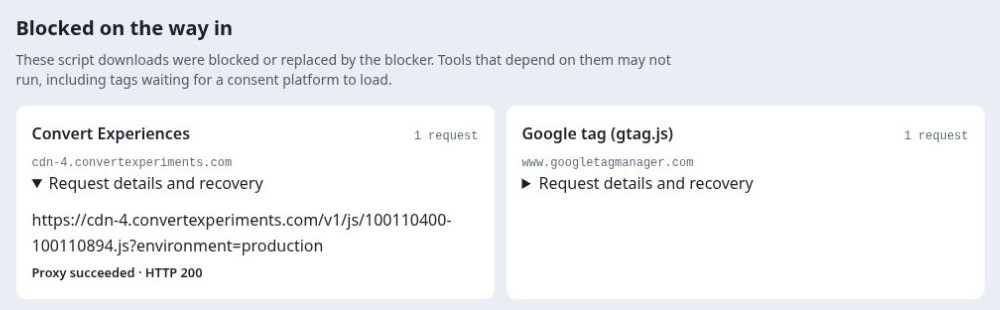
Our public scanner opened the demo in a fresh browser running uBlock Origin with its default filter lists. The blocker stopped the Convert script. Introtrace fetched it through the proxy, and the scanner reported Proxy succeeded · HTTP 200.
The scan was less conclusive for event tracking. Convert metrics and log requests were blocked, and their retries showed success unconfirmed. An optional-settings request showed no recovery. So this scan confirmed that we fetched the loader; it didn’t confirm that Convert received the conversion events.
Following a blocked click into Convert
For the second run, we used Chrome’s developer network-blocking rules to stop direct Convert requests. This let us isolate the failure, but it wasn’t a test with an installed ad blocker. We chose the variation with Convert’s forced-variation parameter.
With recovery unavailable, the original button stayed on the page. With Introtrace enabled, the recovered Convert script changed it to Find my missing analytics.
Then we clicked it. The direct tracking request was blocked. Introtrace relayed a matching conversion payload and received HTTP 200. We checked Convert’s Live Logs as well: the scanner-click goal appeared for the variation at 22:40:47 UTC on 16 October 2026, matching the time of the blocked request and retry.

The scanner and controlled browser test were separate runs. Results may differ with another blocker or browser.
| What we saw | What we could confirm |
|---|---|
| uBlock blocked the loader; Introtrace fetched it with HTTP 200. | The script was fetched successfully in the real blocker scan. |
| The changed button stayed visible in the controlled test. | The recovered script applied the variation in that browser. |
| The relayed click appeared in Convert Live Logs. | Convert received that controlled test conversion. |
This was a functionality check with synthetic QA traffic. We didn’t measure conversion uplift or a site-wide loss rate, and we didn’t pick a winning variation. The forced request carried a test-visitor marker: seeing it in Live Logs doesn’t tell us how ordinary visitors would appear in aggregate reports or whether a result would be statistically significant.
The button changed back on our first attempt
Blocking wasn’t the only problem we found. Our first variation changed the server-rendered button before React hydrated the page. React then put the original text back.
Waiting until after page startup made the change stick in our check. Without looking at the page, we could have mistaken a successful script download for a working variation.
Checks to run before you choose a winner
Keep the page, action, and consent choice the same across three runs:
- Blocking off, recovery off.
- Blocking on, recovery off.
- Blocking on, recovery on.
Note the browser, blocker, filter lists, and time. If you use a developer blocking rule to isolate a request, record that separately from a test with a real extension.
- Look at the variation. Does it appear and stay in place? Then check that the provider records the exposure.
- Perform the action you’re testing. Loading the page won’t tell you whether a signup or checkout event works.
- Find the event in the provider’s logs. Match the goal, variation, and time. An HTTP 200 from the relay is a useful transport check; provider receipt is stronger evidence.
- Check the counts behind the rate. Look at eligible users, assignments, recorded exposures, and outcomes. Investigate unexpected group sizes or gaps in tracking coverage.
- Compare with backend records where possible. Orders and account creations can help you spot missing outcomes. Align dates, IDs, consent scope, and counting rules first; a server request isn’t an analytics session.
- Recheck after tracking changes. A new SDK, consent setting, or recovery deployment can move the numbers even if the product hasn’t changed.
An A/A test can reveal inconsistencies before you compare two different experiences. It can also pass while both groups share the same tracking gap, so keep the other checks.
Our analytics recovery testing checklist walks through the three-run comparison with GA4. You can use the same approach with your experiment provider.
What Introtrace recovered in this test
Introtrace helps supported blocked scripts load and relays supported measurement requests. In this Convert setup, we verified the loader recovery and one scanner-click conversion.
There are limits. The optional-settings request stayed blocked in the scanner. We didn’t test recovery after a visitor declined consent. Recovery also won’t fix a poorly designed experiment, tell you whether someone noticed a late variation, or rule out duplicate events.
Keep your consent controls in place; recovery shouldn’t create tracking they prevented. And if you assign variants on the server, you still need to check how exposures and outcomes are recorded.
To check your own setup, start with the ad blocker scanner and compare the requests it finds with supported integration coverage.
Before you shelve the change
A flat test result might mean the change didn’t help. It might also mean you haven’t collected enough usable data, or that some outcomes never reached the testing tool.
Before you shelve the change or roll it out, check that visitors saw the intended variation and that the provider recorded their actions. In our Convert demo, those needed separate checks. A working button was only half the story.