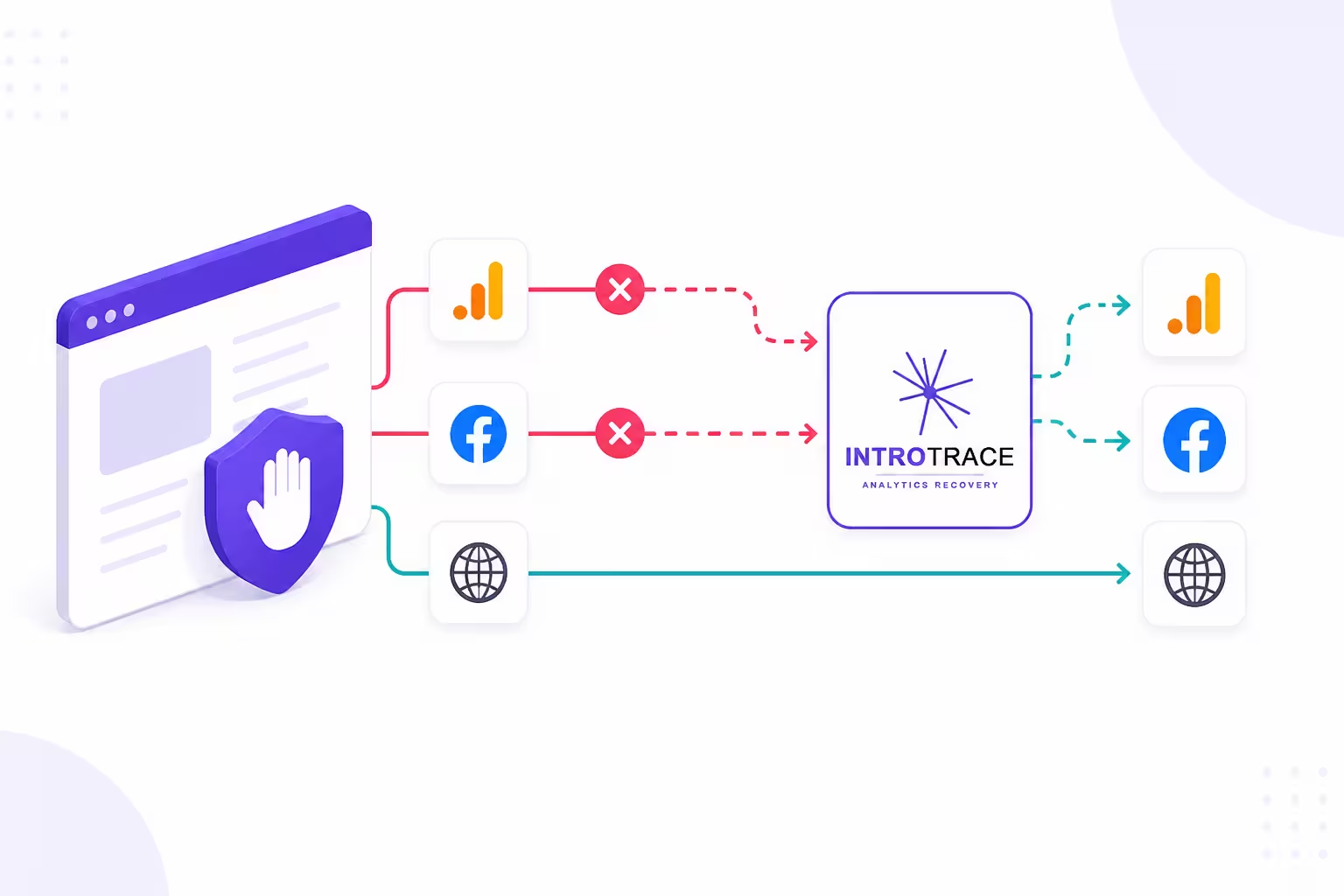
Introtrace helps blocked analytics scripts load and relays blocked events to Google Analytics 4 (GA4), Google Tag Manager (GTM), and Meta Pixel. Add one script tag to get started.
29.5% of internet users worldwide used an ad blocker in Q2 2025; the US figure was 32.5%. Your site’s blocking rate depends on its audience, browsers, and tag configuration. Backlinko — Ad Blocker Usage Statistics
Recovers signals for all major analytics platforms
Google Analytics
Mixpanel
Amplitude
Meta Pixel
TikTok
LinkedIn
Segment
See it on your own site
Find out what's being blocked right now
Paste your URL. We load it in a real browser running uBlock Origin and hand back every analytics, advertising, and consent tag that got killed along the way. About 15 seconds.
Nothing to provision, nothing to re-tag, nothing to maintain afterward. It sits between your analytics and whatever's blocking it.
1
Add one script tag
Add the script near the start of your page’s <head>, before your analytics and consent scripts. It downloads asynchronously.
2
Recover blocked scripts and events
Introtrace serves blocked scripts through its proxy and relays blocked analytics events to their intended provider.
3
Choose your recovery domain
Recovery requests use cdn.introtrace.com by default. Paid plans let you configure a CNAME so requests use your own subdomain, such as t.yourdomain.com.
Try it — no account needed
Paste this demo script in your <head> to see Introtrace in action. Create a free account to get a script generated for your own site.
Add this script near the start of your <head> tag, before your analytics and consent scripts. The async attribute lets the page continue loading while the script downloads.
Demo script
Use this script without an account. Create a free account to associate recovery activity with your organization and view it in the dashboard. A custom recovery subdomain requires a paid plan.
What you get
What the dashboard shows you
Recovery by analytics tool
See which analytics tools receive recovered signals. Use the scanner to test blocking on a specific public page.
Recovery activity over time
See recovered request counts and tool activity over time. Use your analytics platform to verify event names, values, and receipt.
Sessions using recovery
See the share of recorded sessions marked as using the proxy. This is not the percentage of all lost events recovered, or an estimate of global ad blocker use.
Custom domain via CNAME (paid plans)
On a paid plan, configure a CNAME such as t.yourdomain.com to route recovery requests through your own subdomain.
The gap in your data
Your analytics is missing more than you think
29.5%
of internet users worldwide used an ad blocker in Q2 2025.
25–45%
estimated blocking rate for developer and B2B audiences. Directional — measure your own.
32.5%
of internet users in the US used an ad blocker in Q2 2025.
29.5% of internet users worldwide used an ad blocker in Q2 2025, according to Backlinko. That adoption figure is not your site’s analytics loss rate. Blocking depends on the visitor’s browser, filter lists, consent choice, and your tag configuration. Scan a public page to see which requests are blocked in the test configuration.
How does Introtrace recover blocked analytics data?
Introtrace serves blocked analytics scripts and relays blocked events to their intended provider. Requests use cdn.introtrace.com by default. Paid plans support a custom subdomain through CNAME configuration. Recovery coverage depends on the tool and blocking configuration.
Is Introtrace GDPR and CCPA compliant?
Introtrace does not retain end-user analytics payloads passing through its proxy. You remain responsible for consent and your analytics configuration. Review our Privacy Policy and Data Processing Agreement for the processing terms; a signed DPA is available on request.
What analytics tools does Introtrace work with?
Introtrace supports tools including GA4, Google Tag Manager, Meta Pixel, TikTok Pixel, LinkedIn Insight Tag, Mixpanel, Amplitude, and Segment. Test your integration with the blocker configurations your visitors use, or contact us about a specific tool.
Will Introtrace slow down my website?
The script downloads asynchronously so the page can continue loading. Performance depends on your page and the scripts being recovered. Compare page performance before and after installation using your normal monitoring tools.
How is Introtrace different from server-side GTM?
Server-side GTM processes events in a server container you configure and host or obtain through a managed service. Introtrace focuses on blocked script downloads and event requests in the browser. The two can be used together, and Introtrace’s allowance is based on recovered signals.
Start recovering your analytics today
Free plan, no card, 20,000 signals per 30 days. Setup takes about two minutes.